


GitHub-style JSON review with selective merge.
A virtualized React component for comparing, reviewing, and selectively merging large JSON objects — accept/reject change blocks like a pull request, get a live merged result, and stay fast on tens of thousands of lines.
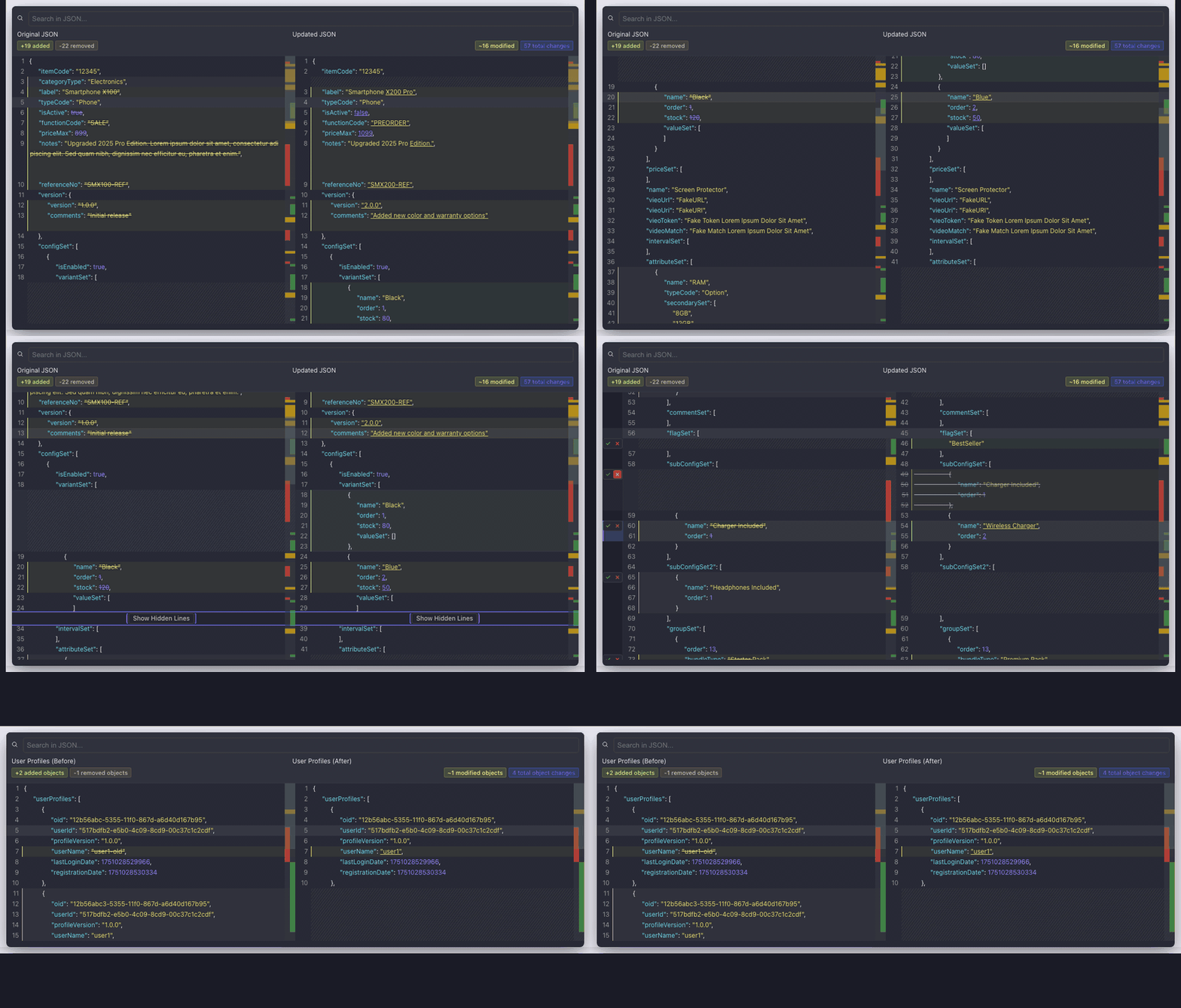
npm install virtual-react-json-diffimport { VirtualDiffViewer } from "virtual-react-json-diff";
<VirtualDiffViewer
oldValue={oldData}
newValue={newData}
height={600}
theme="github-light"
reviewMode
onReviewChange={({ mergedJson }) => console.log(mergedJson)}
/>- Review & merge — accept/reject change blocks; receive live
mergedJson - Virtualized — smooth scrolling for huge diffs via
react-window - Collapse unchanged regions — scan real edits first; expand without mounting the whole tree
- Dual minimap — jump across the file with visual change markers
- Search — highlight and navigate matches
- Programmatic API —
refmethods for next/prev change, paths, expand/collapse, accept/reject all - Object-aware diffs —
compare-keyarray matching + object-level stats - Built-in themes (1.0.20+) —
themeprop; omit it for the original dark palette - Comparison controls — ignore keys/paths,
strict/loose/type-awarestrategies
Most JSON diff viewers are fine for small snippets and fall apart in production dashboards:
| Pain | What usually happens | Here |
|---|---|---|
| Large payloads | UI freezes / huge DOM | Virtualized rows stay responsive |
| Hard to resolve | You can only look, not merge | GitHub-style accept/reject → merged JSON |
| Dense unchanged noise | You scroll forever | Unchanged regions collapse by default |
| Array reshuffles | Noisy line diffs | Optional object-key matching + object stats |
Built for internal tools, config review UIs, CMS/migration previews, and any place you need GitHub for JSON.
How this sits next to common options (honest, feature-level — not a benchmark):
| virtual-react-json-diff | json-diff-kit Viewer |
jsondiffpatch | react-diff-viewer-continued | |
|---|---|---|---|---|
| Built for structured JSON | ✅ | ✅ | ✅ | ❌ (line/text oriented) |
| Virtualized scrolling | ✅ | ✅ | ❌ | ❌ |
| Collapse unchanged regions | ✅ | ❌ | ❌ | ❌ |
| Dual minimap | ✅ | ❌ | ❌ | ❌ |
| Search + jump | ✅ | ❌ | ❌ | ❌ |
| Accept / reject → merged JSON | ✅ | ❌ | patch API only | ❌ |
| Ignore keys / paths | ✅ | via differ config | via filters | ❌ |
| Object-key array matching | ✅ | ✅ | ✅ (objectHash) |
❌ |
| Extra editor weight (Monaco, etc.) | ❌ | ❌ | ❌ | ❌ |
jsondiffpatch is excellent for deltas/patches; react-diff-viewer-continued is great for text/file diffs. json-diff-kit alone covers small JSON side-by-side previews. If you need GitHub-style review + selective merge on large JSON, this package fills that gap.
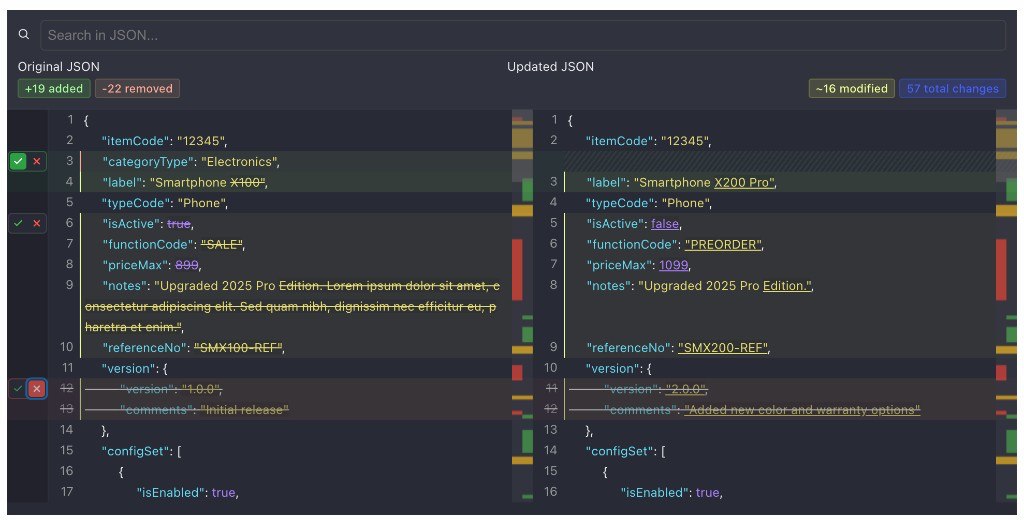
- Enable
reviewMode— each change block gets accept / reject controls - Accept → take the right (new) side; reject/pending → keep the left (old) side
- Listen to
onReviewChangefor{ reviewStates, mergedJson }
Change blocks are hunks (for example a nested object), not arbitrary single lines — so decisions keep valid JSON structure.
Optional reviewGroupingMode: "semantic" (default), "line", or "block".
Unchanged stretches collapse by default. Use Show Hidden Lines, or the ref API (expandPath, expandAll, collapseAll). Expanding does not mount the entire JSON into the DOM — only near-viewport rows render.
differOptions— how the diff is generated (arrays, depth, keys) → passed to json-diff-kitcomparisonOptions— what is ignored / how values match (ignoreKeys,ignorePaths,compareStrategy)
<VirtualDiffViewer
  oldValue={oldData}
  newValue={newData}
  height={600}
  differOptions={{ arrayDiffMethod: "compare-key", compareKey: "id" }}
  comparisonOptions={{ ignoreKeys: ["updatedAt"], compareStrategy: "type-aware" }}
/>| Prop | Type | Description |
|---|---|---|
oldValue |
object |
Original JSON object (left side). |
newValue |
object |
Updated JSON object (right side). |
| Prop | Type | Default | Description |
|---|---|---|---|
height |
number |
— | Height of the diff viewer in pixels. |
leftTitle |
string |
— | Optional title above the left panel. |
rightTitle |
string |
— | Optional title above the right panel. |
className |
string |
— | Custom CSS class on the root container. |
theme |
DiffTheme |
"default" |
Built-in palette (1.0.20+). See Themes. |
| Prop | Type | Default | Description |
|---|---|---|---|
hideSearch |
boolean |
false |
Hide the search bar. |
searchTerm |
string |
"" |
Initial search term. |
onSearchMatch |
(index: number) => void |
— | Fired when a search match is selected. |
showSingleMinimap |
boolean |
false |
Single minimap instead of dual. |
miniMapWidth |
number |
40 |
Width of each minimap in pixels. |
| Prop | Type | Default | Description |
|---|---|---|---|
showLineCount |
boolean |
false |
Show added / removed / modified line counts. |
showObjectCountStats |
boolean |
false |
Object-level stats (needs arrayDiffMethod: "compare-key" + key). |
| Prop | Type | Default | Description |
|---|---|---|---|
differOptions |
DifferOptions |
Engine defaults | How the diff is generated. |
comparisonOptions |
DiffComparisonOptions |
— | What is compared / ignored. |
inlineDiffOptions |
InlineDiffOptions |
{ mode: "char" } |
Inline diff rendering. |
getDiffData |
(diff) => void |
— | Raw [DiffResult[], DiffResult[]] callback. |
| Prop | Type | Default | Description |
|---|---|---|---|
reviewMode |
boolean |
false |
Enable accept/reject UI + review shortcuts. |
reviewGroupingMode |
"semantic" | "line" | "block" |
"semantic" |
How change blocks are grouped. |
onAcceptChange |
(change: ChangeBlock) => void |
— | Fired when a block is accepted. |
onRejectChange |
(change: ChangeBlock) => void |
— | Fired when a block is rejected. |
onReviewChange |
(state: { reviewStates; mergedJson }) => void |
— | Fired when review state or merged JSON updates. |
reviewClassNames |
{ accepted?; rejected?; pending? } |
— | Optional row class names. |
import { useRef, useState } from "react";
import { VirtualDiffViewer, type VirtualDiffViewerRef } from "virtual-react-json-diff";

function ReviewExample({ oldData, newData }) {
  const viewerRef = useRef(null);
  const [mergedJson, setMergedJson] = useState(null);

  return (
    <>
      <button onClick={() => viewerRef.current?.previousChange()}>Prev</button>
      <button onClick={() => viewerRef.current?.nextChange()}>Next</button>
      <button onClick={() => viewerRef.current?.acceptAll()}>Accept all</button>

      <VirtualDiffViewer
        ref={viewerRef}
        oldValue={oldData}
        newValue={newData}
        height={600}
        reviewMode
        onReviewChange={({ mergedJson }) => setMergedJson(mergedJson)}
      />

      <pre>{JSON.stringify(mergedJson, null, 2)}</pre>
    </>
  );
}| Method | Returns | Description |
|---|---|---|
nextChange() |
ChangeBlock | null |
Next change block. |
previousChange() |
ChangeBlock | null |
Previous change block. |
scrollToChange(i) |
void |
Jump to change index i. |
scrollToPath(path) |
boolean |
Expand if needed, scroll to JSON path. |
expandPath(path) |
boolean |
Expand collapsed segment containing path. |
collapsePath(path) |
boolean |
Collapse equal segment containing path. |
expandAll() |
void |
Expand all equal segments (still virtualized). |
collapseAll() |
void |
Collapse equal segments again. |
getCurrentChange() |
ChangeBlock | null |
Currently selected change. |
acceptAll() |
void |
Accept every change (review mode). |
rejectAll() |
void |
Reject every change (review mode). |
Focus the viewer first.
| Key | Action |
|---|---|
ArrowDown / j |
Next change |
ArrowUp / k |
Previous change |
Enter / a (review mode) |
Accept current change |
Escape / r (review mode) |
Reject current change |
theme is available in 1.0.20+. Omit it (or pass an unknown value) and you get default — the original dark palette.
| Value | Look |
|---|---|
default |
Original dark (Dracula-like) |
github-dark |
GitHub Primer dark |
github-light |
GitHub Primer light |
nord |
Nord polar night |
tokyo-night |
Tokyo Night |
solarized-light |
Solarized Light |
Root class: diff-viewer-container. Override --diff-* CSS variables via className if you need a custom look.
Built on json-diff-kit.
MIT © Utku Akyüz
Pull requests, suggestions, and issues are welcome!