

Manage all your system packages using the excellent meta-package-manager project. This Event Plugin can report on outdated packages, generate package inventory reports, create SBOM files, install or remove packages, perform upgrades, back up package state, restore package state, and assemble combined upgrade reports across multiple servers.
This is a xyOps Event Plugin packaged as a pure Node.js marketplace plugin. It is designed to be attached to a scheduled Event and run nightly or weekly, so you can keep visibility into package drift and optionally automate upgrades.
- Pure Node.js marketplace plugin
- Supports two runtime launch methods for
meta-package-manager: precompiled binary oruvx - Supports reporting, e-mail notifications, and actual package upgrades
- Works across many different package managers on Linux, macOS, BSD, and Windows
- Can generate SBOM files in SPDX or CycloneDX formats
- Can back up package state to TOML and restore from a TOML backup
- Can aggregate outdated-package reports from multiple servers into one combined report
- One or more supported package managers installed on the target server
- Sufficient OS privileges for the operation you want to perform
Notes:
- If you use the precompiled binary launcher, the job runner needs network access to GitHub Releases on first run, so the plugin can download the standalone
meta-package-managerbinary. - If you use the
uvxlauncher,uvxmust already be installed and available on every target server where the plugin will run. - Read-only tools such as reports and SBOM generation usually work with normal user permissions.
- Mutating tools such as install, upgrade, remove, and restore may require administrator or root privileges, depending on the package manager.
- The plugin only works with package managers that are both supported by
meta-package-managerand actually detected on the current server.
The plugin exposes a toolset with nine tools:
- Outdated Packages
- List All Packages
- Software Bill of Materials
- Install Packages
- Upgrade Packages
- Remove Packages
- Backup Packages
- Restore Packages
- Combined Report
For most users, the main setup is simple:
- Install or import the Plugin into xyOps.
- Create an Event that uses Package Manager.
- Choose the Outdated Packages tool.
- Decide whether you want report-only, e-mail notifications, and/or automatic upgrades.
- Schedule the Event to run nightly or weekly.
Nightly is a good fit for fast-moving systems. Weekly is a good fit for lower-change environments.
These parameters are available at the plugin level:
| Parameter | Description |
|---|---|
MPM Launcher |
Selects how to run meta-package-manager: precompiled binary or uvx. |
Tool Select |
Selects which package-management operation to run. |
Package Managers |
JSON object that enables or disables individual package managers. |
Available options:
Binary: Download and cache the precompiled standalonemeta-package-managerexecutable, then run it directly.UVX: Executemeta-package-managerviauvx, pinned to the plugin's bundled version, assuminguvxis already installed on the target server.
Why this exists:
- On some Linux systems, the upstream precompiled binaries may require a newer
glibcthan the server provides. - A common failure looks like:
/lib/x86_64-linux-gnu/libm.so.6: version GLIBC_2.38 not found. - The
uvxoption gives users a compatibility fallback when the standalone binary does not run cleanly on their fleet.
Recommended use:
- Use
Binaryif you want the simplest setup and it works on your servers. - Use
UVXif you have already standardized on Astraluv, or if the standalone binary fails due toglibccompatibility issues. - If you choose
UVX, make sure it is present on every server that may run the Event.
By default, the plugin enables all detected package managers except for a select few:
{
  "*": true,
  "cpan": false,
  "uv": false,
  "vscode": false,
  "vscodium": false
}
Please adjust to taste.
Behavior notes:
*means "enable all detected managers by default."- Any manager explicitly set to
falseis excluded. - Any manager explicitly set to
trueis included, as long as it is detected on the current server. - If no supported managers are detected after filtering, the job fails.
As of the bundled meta-package-manager version used by this plugin, the following package managers are supported:
apkapmaptapt-mintbrewcargocaskchococomposercpandeb-getdnfdnf5emergeeopkgflatpakfwupdgemguixmacportsmasnixnpmopkgpacaurpacmanpacstallparupippipxpkgportsscoopsdkmansfsusnapsteamcmdstewuvuvxvscodevscodiumwingetxbpsyarnyarn-berryyayyumzerobrewzypper
Important notes:
- Support here means
meta-package-managerknows how to work with the manager. - Actual availability still depends on your operating system and what is installed on the target server.
- The plugin automatically queries the current server and only operates on managers that are detected locally.
Checks all selected package managers for available upgrades, generates a Markdown report in the job output, optionally sends an e-mail, and can optionally perform the upgrades.
This is the best tool to use for a scheduled nightly or weekly maintenance event.
| Parameter | Required | Description |
|---|---|---|
Send Email |
No | Send an e-mail containing the outdated package report. |
Perform Upgrades |
No | Actually perform all available upgrades across the selected package managers. |
Email Addresses |
No | Comma-separated destination list for notification e-mails. |
Behavior notes:
- If no outdated packages are found, the job succeeds and exits quietly.
- If
Send Emailis enabled, e-mail is only sent when outdated packages are found, andEmail Addressesis populated. - To reduce duplicate notifications, the plugin remembers the last exact outdated report it e-mailed and skips re-sending the same report again.
- If
Perform Upgradesis enabled, upgrades are executed after the report is generated.
Recommended use:
- Schedule this tool nightly or weekly.
- Start with
Perform Upgradesdisabled until you are comfortable with the reporting. - Once validated, you can enable automatic upgrades if that matches your maintenance policy.
Generates a Markdown report listing all installed packages across the selected package managers, and can optionally send the report by e-mail.
| Parameter | Required | Description |
|---|---|---|
Send Email |
No | Send an e-mail containing the installed package report. |
Email Addresses |
No | Comma-separated destination list for notification e-mails. |
Behavior notes:
- The report is attached to the job output as Markdown.
- Unlike the outdated report, this is a full inventory of all installed packages.
- If
Send Emailis enabled, the plugin sends the report after the job succeeds.
This tool is useful for audits, baseline inventory snapshots, and software review workflows.
Generates a SBOM file for the selected package managers and attaches it to the xyOps job output.
| Parameter | Required | Description |
|---|---|---|
SBOM Format |
Yes | SBOM standard to use: SPDX or CycloneDX. |
File Format |
Yes | Output file format. See below. |
Supported SBOM combinations:
| Standard | JSON | XML | YAML | TAG | RDF |
|---|---|---|---|---|---|
SPDX |
Yes | Yes | Yes | Yes | Yes |
CycloneDX |
Yes | Yes | No | No | No |
Behavior notes:
- The generated filename looks like
sbom-STANDARD-SERVERID.EXT, for examplesbom-spdx-s12345.json. - The file is attached to the job output for download or downstream workflow use.
CycloneDXonly supportsJSONandXML.
This is a good fit for compliance, security, asset inventory, and software supply chain workflows.
Installs one or more specific packages using the selected package managers.
| Parameter | Required | Description |
|---|---|---|
Package IDs |
Yes | Comma-separated list of package IDs to install. Versions may be included with @version when supported by the underlying package manager. |
Behavior notes:
- The plugin passes the package IDs through to
meta-package-manager. - Whether version pinning works depends on the underlying package manager.
- You should generally target this at the specific server where you want the installation to occur.
Example:
git,curl,jq
Example with versions where supported:
node@22,npm@10
Upgrades one or more specific packages using the selected package managers.
| Parameter | Required | Description |
|---|---|---|
Package IDs |
Yes | Comma-separated list of package IDs to upgrade. Versions may be included with @version when supported by the underlying package manager. |
Behavior notes:
- This is for targeted upgrades, not a full "upgrade everything" pass.
- For full automatic maintenance, the Outdated Packages tool with
Perform Upgradesis usually the better choice.
Removes one or more specific packages using the selected package managers.
| Parameter | Required | Description |
|---|---|---|
Package IDs |
Yes | Comma-separated list of package IDs to remove. |
Behavior notes:
- This is a destructive operation.
- Use with care, especially on shared servers or servers managed by configuration tools.
Creates a TOML backup of the current installed package state and attaches it to the job output.
This gives you a portable package manifest that can later be fed back into the plugin using the Restore Packages tool.
Parameters:
- None
Behavior notes:
- The generated filename looks like
packages-SERVERID.toml. - The backup file is attached to the job output.
- This is useful before major upgrades, migrations, or server rebuilds.
Restores package state from a TOML backup file that is provided as job input.
Parameters:
- None
Behavior notes:
- The plugin expects an input file attached to the job.
- It uses the first input file as the restore source.
- If no input file is present, the job fails.
Typical usage:
- Run Backup Packages on a source server.
- Download or pass the generated TOML file into another workflow step.
- Run Restore Packages with that TOML file attached as job input.
This tool merges multiple outdated-package reports into one combined Markdown report and can optionally send it by e-mail.
| Parameter | Required | Description |
|---|---|---|
Send Email |
No | Send an e-mail containing the combined report. |
Email Addresses |
No | Comma-separated destination list for notification e-mails. |
This tool is designed to receive Outdated Packages reports from multiple servers as job input data, by way of a xyOps Workflow, and a Multiplex / Join operation. Example workflow:
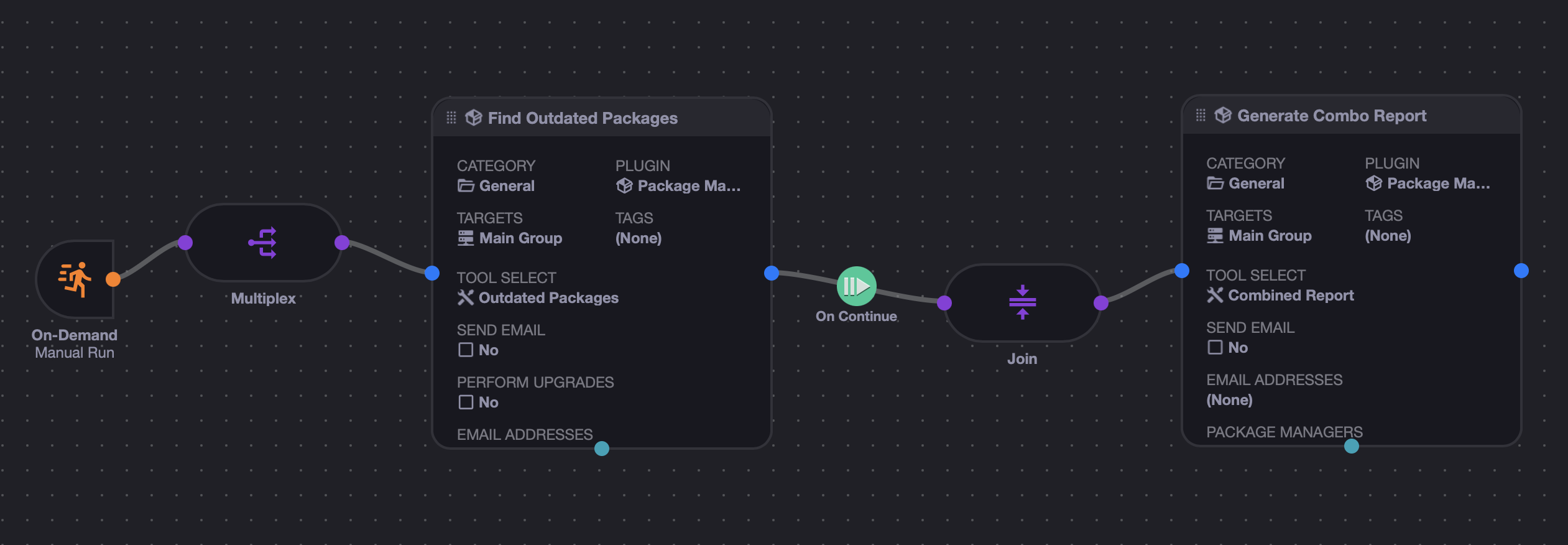
The idea here is that you multiplex the "Outdated Packages" jobs across your server fleet (or any target groups you want), and then those reports are piped through a Join controller, so they are all collected and combined before calling the "Combined Report" tool as a final job.
Behavior notes:
- This tool expects multiplexed input data items from upstream jobs.
- It is designed to run after multiple Outdated Packages jobs have completed.
- It produces a combined server summary plus a combined package summary.
- Like the single-server outdated report, it de-duplicates identical e-mail reports.
For most installations, the best starting point is to create a scheduled Event that uses Outdated Packages:
- Run nightly or weekly
- Send e-mail notifications
- Optionally perform upgrades
- Target the server or group of servers whose packages you want to manage
Suggested rollout:
- Start with report-only mode.
- Add e-mail notifications so the report reaches the right people.
- After you trust the results, enable automatic upgrades if desired.
If you want a cluster-wide summary, build a workflow that runs Outdated Packages across multiple servers, then joins the outputs into Combined Report.
A few details about how the plugin works at runtime:
- The plugin can launch
meta-package-managerin one of two ways, depending on yourMPM Launcherselection. - In
Binarymode, the plugin downloads the standalonemeta-package-managerbinary from GitHub Releases the first time it runs on a server and caches it locally for reuse. - In
UVXmode, the plugin invokesuvx meta-package-manager==VERSIONinstead of downloading a standalone binary. - Each non-combo run first asks
meta-package-managerwhich package managers are available on the current server. - The plugin filters that list using your
Package ManagersJSON configuration. - Reports are emitted back to xyOps as Markdown job output.
- Generated files such as SBOM and package backup files are attached to the job output.
The plugin expects a xyOps job payload on STDIN and emits XYWP / report output on STDOUT.
If you select the Binary launcher, the plugin will attempt to download the standalone meta-package-manager binary from GitHub Releases on first run.
If you select the UVX launcher, make sure uvx is installed and available in the server's PATH.
cat <<'JSON' | node index.js
{
  "xy": 1,
  "type": "job",
  "id": "jtestpkg001",
  "event": "etestpkg001",
  "plugin": "ptestpkg001",
  "server": "local",
  "temp_dir": "/tmp",
  "params": {
    "tool": "outdated",
    "send_email": false,
    "do_upgrade": false,
    "email_addrs": "",
    "managers": {
      "*": true
    }
  },
  "input": {
    "data": {},
    "files": []
  }
}
JSONThis plugin does not collect telemetry, analytics, or usage metrics.
Requests made by the underlying package managers, and by GitHub Releases when downloading the standalone meta-package-manager binary, may be logged by those services according to their own policies.
This plugin is powered by meta-package-manager, by Kevin Deldycke, licensed under GPL-2.0.
MIT.