So, a new computer vision model just dropped last night. It's called GPT-54o-mini-vision-pro-max-xxxl. It's a super cool model, open-source, open-weights, open-data, all the good stuff.
You're excited. You want to try it out.
But it's written in a new framework, TyPorch, that you know nothing about.
You don't want to spend a weekend learning TyPorch just to find out the model is not what you expected.
This is where x.infer comes in. It's a simple library that allows you to run inference with any computer vision model in just a few lines of code. All in Python.
Out of the box, x.infer supports the following frameworks:


In total x.infer already supports over 1000+ models from all the above frameworks.
Tasks supported:



Run any supported model using the following 4 lines of code:
import xinfer

model = xinfer.create_model("vikhyatk/moondream2")
model.infer(image, prompt)         # Run single inference
model.infer_batch(images, prompts) # Run batch inference
model.launch_gradio()              # Launch Gradio interface
Have a custom model? Create a class that implements the BaseModel interface and register it with x.infer. See Adding New Models for more details.
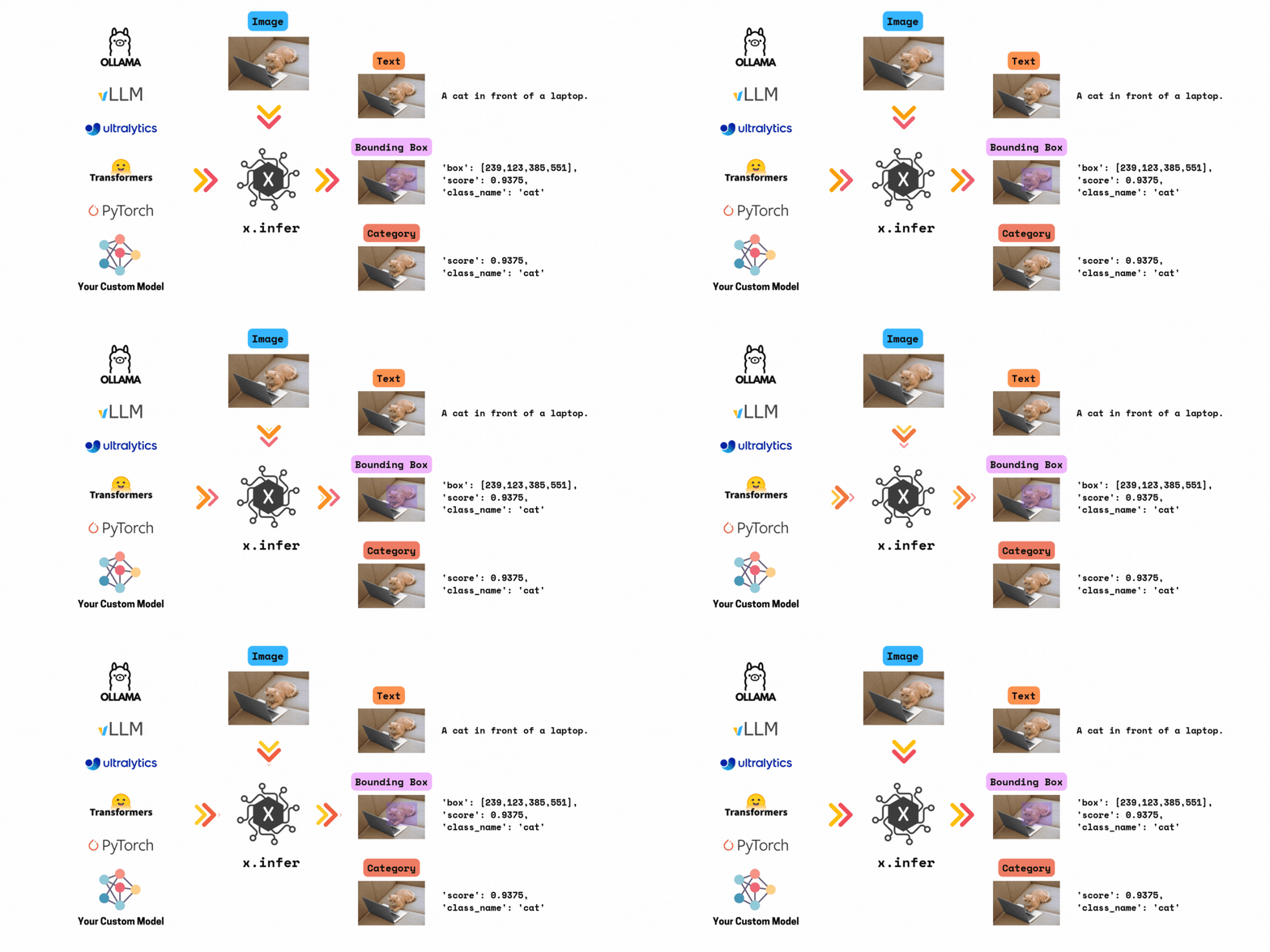
- Unified Interface: Interact with different machine learning models through a single, consistent API.
- Modular Design: Integrate and swap out models without altering the core framework.
- Extensibility: Add support for new models and libraries with minimal code changes.
Here's a quick example demonstrating how to use x.infer with a Transformers model:


import xinfer

model = xinfer.create_model("vikhyatk/moondream2")

image = "https://raw.githubusercontent.com/vikhyat/moondream/main/assets/demo-1.jpg"
prompt = "Describe this image. "

model.infer(image, prompt)

>>> An animated character with long hair and a serious expression is eating a large burger at a table, with other characters in the background.
Get a list of models:
xinfer.list_models() Available Models
┏━━━━━━━━━━━━━━━━┳━━━━━━━━━━━━━━━━━━━━━━━━━━━━━━━━━━━━━━━━━━━━━━━━━┳━━━━━━━━━━━━━━━━━━━━━━┓
┃ Implementation ┃ Model ID ┃ Input --> Output ┃
┡━━━━━━━━━━━━━━━━╇━━━━━━━━━━━━━━━━━━━━━━━━━━━━━━━━━━━━━━━━━━━━━━━━━╇━━━━━━━━━━━━━━━━━━━━━━┩
│ timm │ eva02_large_patch14_448.mim_m38m_ft_in22k_in1k │ image --> categories │
│ timm │ eva02_large_patch14_448.mim_m38m_ft_in1k │ image --> categories │
│ timm │ eva02_large_patch14_448.mim_in22k_ft_in22k_in1k │ image --> categories │
│ timm │ eva02_large_patch14_448.mim_in22k_ft_in1k │ image --> categories │
│ timm │ eva02_base_patch14_448.mim_in22k_ft_in22k_in1k │ image --> categories │
│ timm │ eva02_base_patch14_448.mim_in22k_ft_in1k │ image --> categories │
│ timm │ eva02_small_patch14_336.mim_in22k_ft_in1k │ image --> categories │
│ timm │ eva02_tiny_patch14_336.mim_in22k_ft_in1k │ image --> categories │
│ transformers │ Salesforce/blip2-opt-6.7b-coco │ image-text --> text │
│ transformers │ Salesforce/blip2-flan-t5-xxl │ image-text --> text │
│ transformers │ Salesforce/blip2-opt-6.7b │ image-text --> text │
│ transformers │ Salesforce/blip2-opt-2.7b │ image-text --> text │
│ transformers │ fancyfeast/llama-joycaption-alpha-two-hf-llava │ image-text --> text │
│ transformers │ vikhyatk/moondream2 │ image-text --> text │
│ transformers │ sashakunitsyn/vlrm-blip2-opt-2.7b │ image-text --> text │
│ ultralytics │ yolov8x │ image --> boxes │
│ ultralytics │ yolov8m │ image --> boxes │
│ ultralytics │ yolov8l │ image --> boxes │
│ ultralytics │ yolov8s │ image --> boxes │
│ ultralytics │ yolov8n │ image --> boxes │
│ ... │ ... │ ... │
│ ... │ ... │ ... │
└────────────────┴─────────────────────────────────────────────────┴──────────────────────┘
For all models, you can launch a Gradio interface to interact with the model.
model.launch_gradio()
You can also launch a Gradio interface with all models available in a dropdown. Pick a model, upload an image, and see the inference results.
xinfer.launch_gradio_demo()
See Gradio Demo for more details.
Important
You must have PyTorch installed to use x.infer.
To install the barebones x.infer (without any optional dependencies), run:
pip install xinferx.infer can be used with multiple optional libraries. You'll just need to install one or more of the following:
pip install "xinfer[transformers]"
pip install "xinfer[ultralytics]"
pip install "xinfer[timm]"
pip install "xinfer[vllm]"
To install all libraries, run:
pip install "xinfer[all]"To install from a local directory, run:
git clone https://github.com/dnth/x.infer.git
cd x.infer
pip install -e .| Model | Usage |
|---|---|
| BLIP2 Series | xinfer.create_model("Salesforce/blip2-opt-2.7b") |
| Moondream2 | xinfer.create_model("vikhyatk/moondream2") |
| VLRM-BLIP2 | xinfer.create_model("sashakunitsyn/vlrm-blip2-opt-2.7b") |
| JoyCaption | xinfer.create_model("fancyfeast/llama-joycaption-alpha-two-hf-llava") |
You can also load any AutoModelForVision2Seq model
from Transformers by using the Vision2SeqModel class.
from xinfer.transformers import Vision2SeqModel

model = Vision2SeqModel("facebook/chameleon-7b")
model = xinfer.create_model(model)
All models from TIMM fine-tuned for ImageNet 1k are supported.
For example load a resnet18.a1_in1k model:
xinfer.create_model("resnet18.a1_in1k")You can also load any model (or a custom timm model) by using the TIMMModel class.
from xinfer.timm import TimmModel

model = TimmModel("resnet18")
model = xinfer.create_model(model)| Model | Usage |
|---|---|
| YOLOv8 Series | xinfer.create_model("yolov8n") |
| YOLOv10 Series | xinfer.create_model("yolov10x") |
| YOLOv11 Series | xinfer.create_model("yolov11s") |
You can also load any model from Ultralytics by using the UltralyticsModel class.
from xinfer.ultralytics import UltralyticsModel

model = UltralyticsModel("yolov5n6u")
model = xinfer.create_model(model)| Model | Usage |
|---|---|
| Molmo-72B | xinfer.create_model("allenai/Molmo-72B-0924") |
| Molmo-7B-D | xinfer.create_model("allenai/Molmo-7B-D-0924") |
| Molmo-7B-O | xinfer.create_model("allenai/Molmo-7B-O-0924") |
To use Ollama models, you'll need to install the Ollama on your machine. See Ollama Installation Guide for more details.
| Model | Usage |
|---|---|
| LLaVA Phi3 | xinfer.create_model("ollama/llava-phi3") |
-
Step 1: Create a new model class that implements the
BaseModelinterface. -
Step 2: Implement the required abstract methods
load_model,infer, andinfer_batch. -
Step 3: Decorate your class with the
register_modeldecorator, specifying the model ID, implementation, and input/output.
For example:
@register_model("my-model", "custom", ModelInputOutput.IMAGE_TEXT_TO_TEXT)
class MyModel(BaseModel):
    def load_model(self):
        # Load your model here
        pass

    def infer(self, image, prompt):
        # Run single inference
        pass

    def infer_batch(self, images, prompts):
        # Run batch inference here
        pass
See an example implementation of the Molmo model here.
If you'd like to contribute, here are some ways you can help:
-
Add support for new models: Implement new model classes following the steps in the Adding New Models section.
-
Improve documentation: Help us enhance our documentation, including this README, inline code comments, and the official docs.
-
Report bugs: If you find a bug, please open an issue with a clear description and steps to reproduce.
-
Suggest enhancements: Have ideas for new features? Open a feature request.
-
Submit pull requests: Feel free to fork the repository and submit pull requests for any improvements you've made.
Please also see the code of conduct here. Thank you for helping make x.infer better!
x.infer is not affiliated with any of the libraries it supports. It is a simple wrapper that allows you to run inference with any of the supported models.
Although x.infer is Apache 2.0 licensed, the models it supports may have their own licenses. Please check the individual model repositories for more details. I will not b