
Micropython Snake Game for ESP32 using SSD1306 OLED Screen (Original C++ Version)
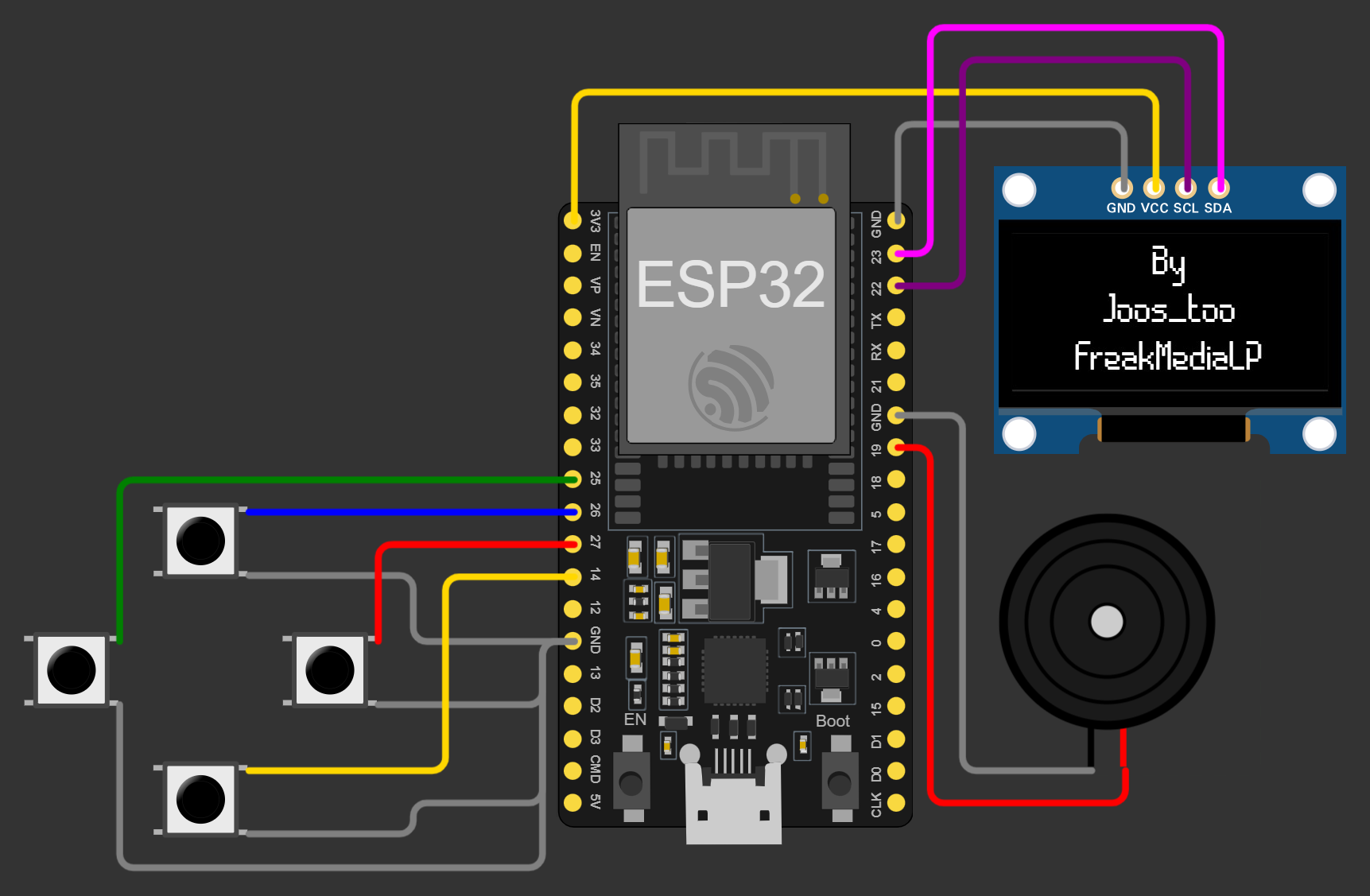
- Connect
VCCfrom Screen with3V3on ESP32- Connect
SCLfrom Screen withG22 - Connect
SDAfrom Screen withG23
- Connect
- Connect Ground (
GND)
-
Connect one Button side with ESP32
- LEFT with Pin
G25 - UP with Pin
G26 - RIGHT with Pin
G27 - DOWN with Pin
G14
- LEFT with Pin
-
Connect second Pin on each Button witch Ground (
GND)
- Connect
+from Buzzer withG19 - Connect
-from Buzzer with Ground (GND)
Use a tool f.E. Thonny to flash the Micropython Interpreter to the ESP32
Save following files on the ESP32:
boot.pysnake.pyssd1306.pysettings.json