
An extension that launches your installed pi binary in RPC mode and turns it into a VS Code-native chat workflow. It keeps the agent close to your editor while staying lightweight and true to pi's minimalism.
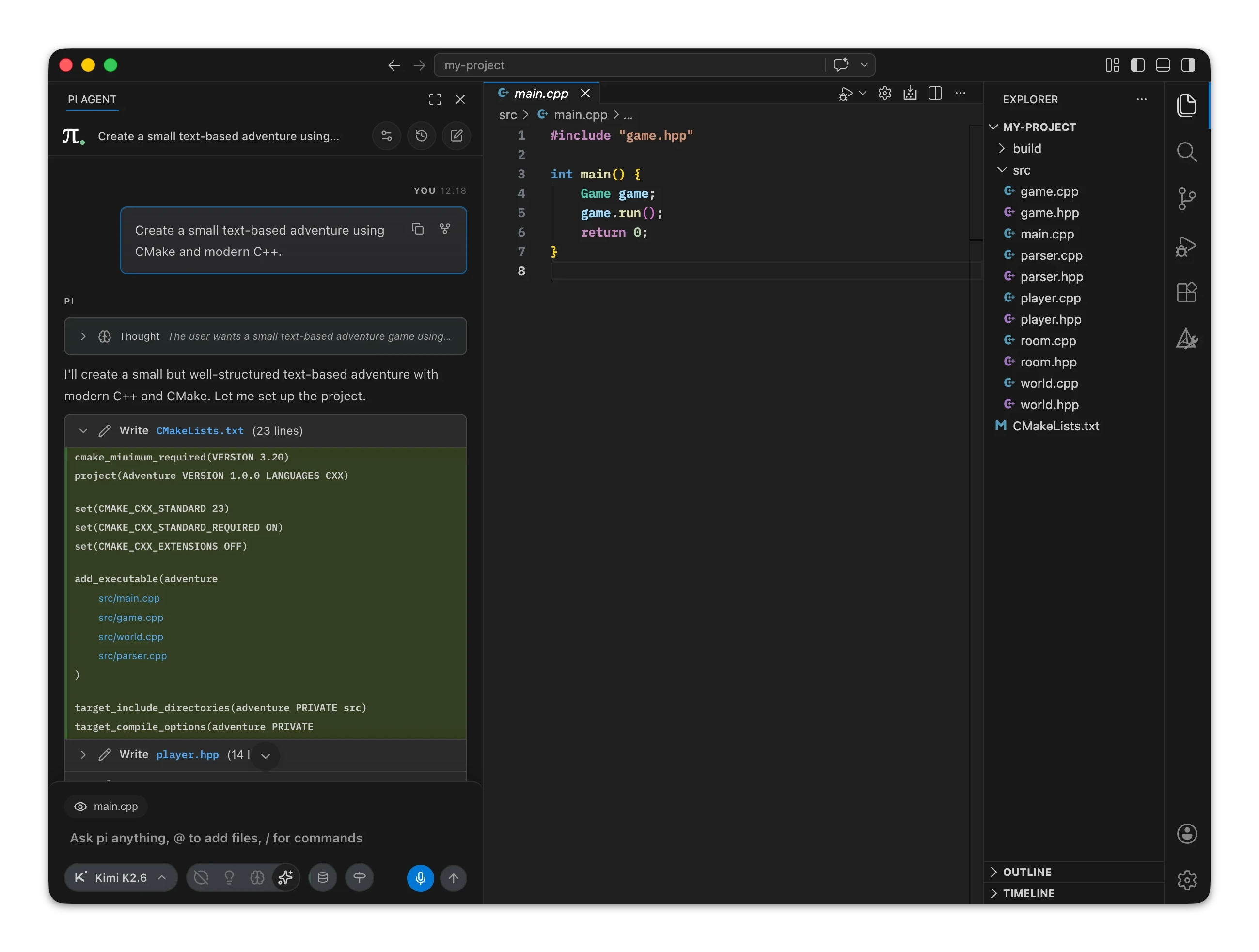


Tested on macOS, Linux, and Windows.
- Built for long-running coding sessions
- Lightweight and efficient, bring your own pi
- Rich tool rendering and streaming, including Mermaid diagrams and math
- Message queuing, steering, and follow-up handling
- Support for your pi prompts, skills, and extensions, such as
/commitand/skill:plan-development - Local microphone dictation, powered by
whisper.cpp, Rust, and Swift - Session and package management from within VS Code
- Model selector, model cycling, and thinking-level controls
- Context window tracking, automatic compaction, manual compaction
- Workspace-aware
@file and folder mentions - Pasted image attachments in chat
- Post-run changed-files summaries after editing sessions
- Various UI customization options
Please visit the homepage for a comprehensive overview and FAQ.
- Ensure pi is set up
- Install the extension from the VS Code Marketplace or Open VSX.
- Open the
PI AGENTview in the activity bar. - Start a chat.
The extension bundles whisper.cpp and native voice helpers written in Rust (Windows, Linux) and Swift (macOS).
When you use the microphone button, the extension will ask for your permission to download the whisper models (configured with pi.voice.model) once.
Models are downloaded from: https://huggingface.co/ggerganov/whisper.cpp/resolve/main/<model-file>
The dictation will always run locally, on your device. The extension will never send any data to any server.
Dictation supports:
- macOS
- Windows x64 & ARM64
- Linux x64 & ARM64
Use pi.voice.enabled to show or hide the microphone button. Use pi.voice.model to choose between the built-in tiny/base and multilingual/English-only model options.
You can always delete the downloaded models via the info menu -> "Delete downloaded dictation model".
Please feel free to provide feedback and/or report issues here on GitHub. The extension is currently in a prerelease phase and I appreciate your feedback, as it can help steer the extension in the right direction for all of us.
Troubleshooting guideline
- Make sure
piis installed and available on your shellPATH. - If it is installed somewhere custom, set
pi.binaryPathto the absolute path. - If the extension reports an incompatible version, update your local
piinstall first.
- Open the
PI AGENTview and follow onboarding if it appears. - Check
pi.agentDirif you keep pi config somewhere other than the default agent directory. - Make sure provider credentials are configured for the model you want to use.
- Check
pi.agentDir. The extension uses the resolved agent directory for both runtime startup and session-history file access. - If you switch agent directories, restart pi from the extension so the running process and file-backed history stay aligned.
- Re-check the provider credentials stored in your pi config or VS Code-backed secrets.
- After updating a key, restart pi from the extension so the spawned process picks up the new environment.
- Confirm
pi.voice.enabledis turned on. - Allow microphone access for VS Code in your OS privacy or audio settings.
- On unsupported platforms, the microphone button explains that dictation is unavailable.
- To collect troubleshooting logs, enable
pi.diagnostics.enabled, reproduce the issue, then run pi: Export Diagnostics Log... and include the exported file with your report.
How to diagnose vscode-pi
Diagnostics are off by default. Enable pi.diagnostics.enabled only when you are troubleshooting or preparing a support report.
When enabled, the extension writes high-signal progress and error logs to the pi Diagnostics output channel. The log includes lifecycle events, startup/runtime errors, model and thinking-level changes, compaction activity, token and session statistics, resource actions, and dictation state. It is intended to help identify why a workflow failed without dumping every internal detail of the extension.
Use pi: Show Diagnostics Log to inspect the current log, or pi: Export Diagnostics Log... to save it to a file of your choosing. Review exported logs before sharing them.
Unofficial extension. This project is community-built and is not affiliated with or endorsed by the pi agent project.