The wizard workbench is a few things:
- A collection of PostHog-less apps and codebases for testing and experimenting with the PostHog Wizard
- A toolbox of scripts and utilities to help you analyze, debug, and inspect Wizard runs
- A workshop and target practice environment where you can run the full local development stack
A stable of test applications and codebases, with no PostHog installed, lives in /apps/<framework>/<app-name>.
apps/
└── next-js/
│   ├── 15-app-router-saas
│   ├── 15-pages-router-saas
└── react-router/
│   ├── react-router-v7-projects
│   ├── saas-template
└── django/
│   ├── 15-pages-router-saas
└── flask/
└── laravel/
To add a new test app, create a directory under /apps.
The services/ directory is a toolbox for scripts and utilities to help with Wizard development.
services/
├── pr-evaluator/    # AI-powered code evaluation for PRs and branches
├── wizard-ci/       # Automated wizard runs with PR creation
├── wizard-run/      # Interactive wizard runner
└── github/          # GitHub/git utilities
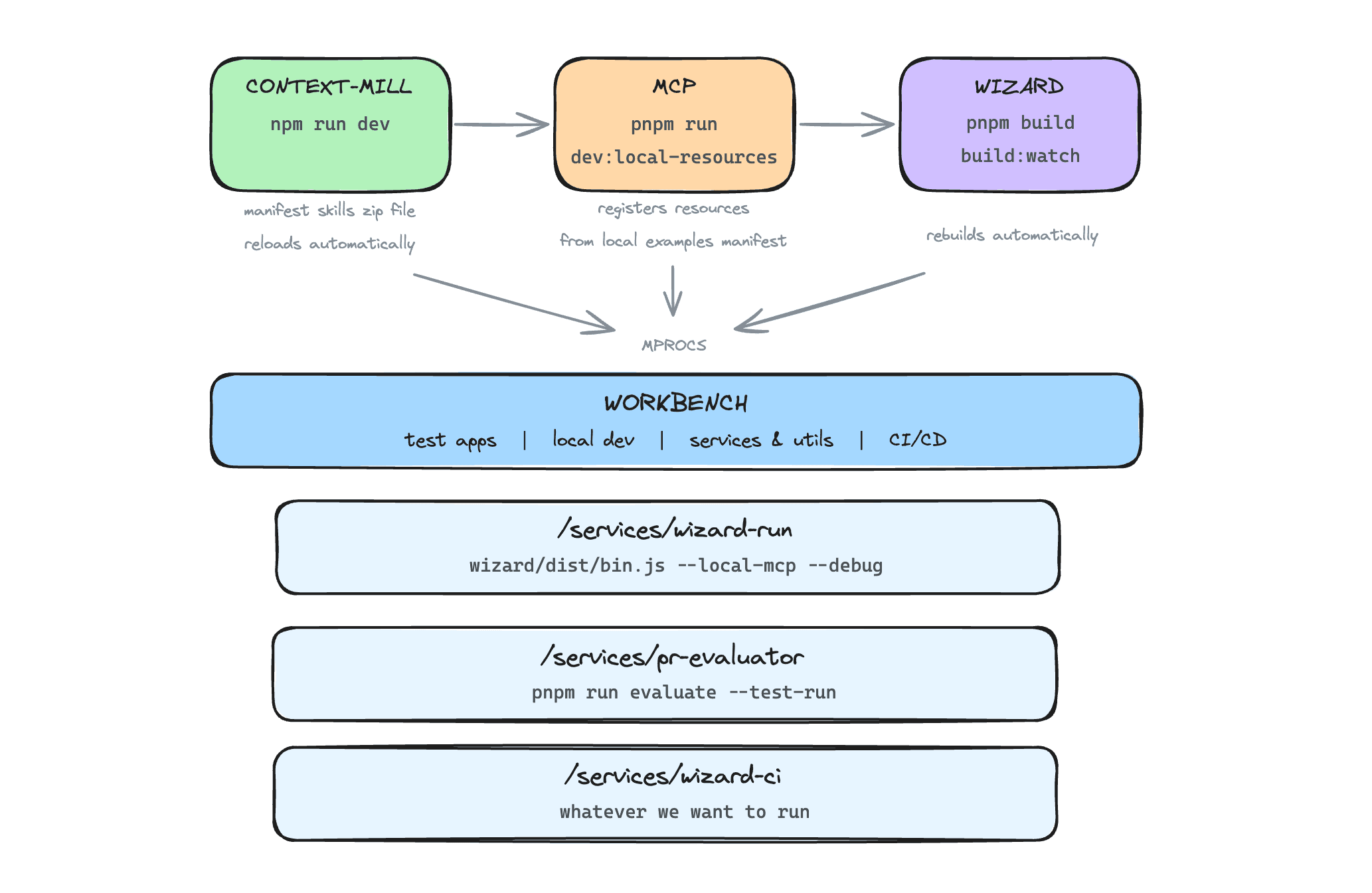
The workbench can run the entire Wizard stack in local development mode, with hot reload where supported. It uses mprocs to run all the repos defined in your .env file:
- Context Mill repo
- Wizard repo
- MCP repo (within PostHog monorepo)
Install mprocs:
brew install mprocsInstall dependencies in this repo:
pnpm installCopy and edit .env with your repo paths and API key:
cp .env.example .env| Variable | Required | Description |
|---|---|---|
CONTEXT_MILL_PATH |
Yes | Path to your local context-mill repo (e.g., ~/development/context-mill) |
MCP_PATH |
Yes | Path to MCP service (e.g., ~/development/posthog/services/mcp) |
WIZARD_PATH |
Yes | Path to your local wizard repo (e.g., ~/development/wizard) |
POSTHOG_PERSONAL_API_KEY |
For CI | PostHog personal API key for wizard CI mode and PR evaluator |
POSTHOG_REGION |
No | PostHog region (us or eu). Defaults to us. Can also be set via --region flag or workflow input. |
Make sure you've set up and installed dependencies for all required repos.
Enter mprocs to run the local dev stack:
mprocsUse keyboard shortcuts in mprocs: s to start, x to stop, r to restart, q to quit.
| Process | Port | Description |
|---|---|---|
context-mill |
8765 | Context Mill server with MCP resources ZIP |
mcp |
8787 | MCP server using local resources |
mcp-inspector |
6274 | MCP Inspector UI for debugging |
wizard-build |
- | Builds and watches Wizard for changes |
| Process | Description |
|---|---|
wizard-run |
Interactive app selector - choose which app to run wizard on |
wizard-tail-run |
Tail the wizard's verbose output (/tmp/posthog-wizard.log) |
wizard-ci-run |
Full CI flow: run wizard, create PR, evaluate |
wizard-ci-local-run |
CI flow with local evaluation (no PR) |
wizard-ci-create-pr |
Push branch and create PR only (skip wizard run) |
wizard-ci-evaluate-pr |
Evaluate an existing PR or local branch |
The Wizard CI automates running the PostHog Wizard on test apps, creating PRs with the changes, and evaluating the quality of the integration.
The wizard-ci service runs the Wizard on a test app and handles the full CI flow. It also uses the github service to checkout branches and open PRs in the remote repo for code diffs.
# Run on a specific app
pnpm wizard-ci --app next-js/15-app-router-saas --evaluate
What it does:
- Resets the test app to a clean state
- Runs the Wizard to add PostHog integration
- Commits changes to a branch and creates a PR
- Optionally runs the PR evaluator to assess integration quality
The wizard-ci.yml workflow is a unified CI/CD pipeline that handles app discovery, parallel execution, PR creation, evaluation, and Slack notifications.
| Input | Default | Description |
|---|---|---|
app |
all |
all, directory (next-js), or app path (next-js/15-app-router-todo) |
evaluate |
true |
Run PR evaluator after wizard completes |
base_branch |
main |
Base branch for PR |
wizard_ref |
main |
Wizard repo branch/tag/sha |
context_mill_ref |
main |
Context Mill repo branch/tag/sha |
posthog_ref |
master |
PostHog repo branch/tag/sha (for MCP) |
posthog_region |
us |
PostHog region (us or eu) |
trigger_id |
auto-gen | Seven character ID |
notify_slack |
false |
Post notifications to Slack |
Each trigger is assigned a unique short ID that tracks the group of wizard CI runs it created.
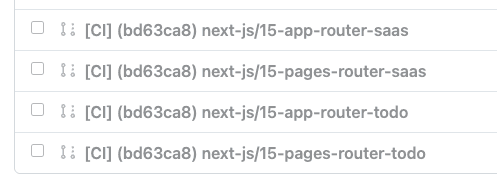
You can activate wizard-ci.yml in a few ways:
- Manual - Run from GitHub Actions UI
- Schedule - Runs on cron
- Dispatch - Webhook call via
repository_dispatchwith event typewizard-ci-trigger