#I2PChat(formerly I2P - Messenger)
End-to-end encrypted peer-to-peer messenger over I2P. Uses the SAM bridge for anonymous, serverless communication with full file transfer support.
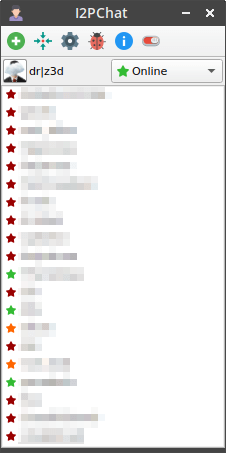
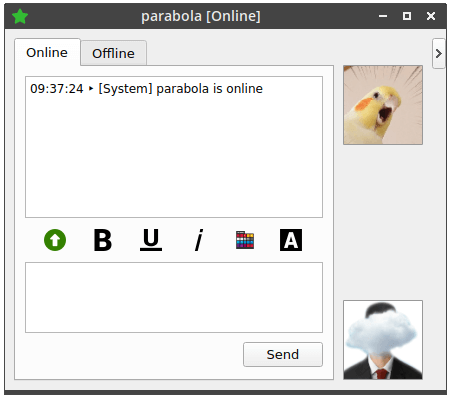
- Peer-to-peer messaging and file transfer over I2P — no central server
- End-to-end encryption via I2P's garlic routing
- Contact list with online status indicators (Online, Away, Invisible, Do Not Disturb)
- Userlist sorting — alphabetically, by date added, last communication, or last online
- Online visibility control per contact (visible, hidden, blocked)
- Request authorization dialog for new incoming connections
- Transient (non-persistent) identity option for session-only keys
- Auto-away detection with configurable timeout
- Inline pending messages — compose while offline, sent automatically on reconnection
- Emoticon support with punctuation-boundary detection
- Automatic URL linking in chat messages
- Optional b32.i2p web profile page with avatar, bio, and interests
- Multi-file static web server hosted at your b32.i2p address — drop files in
~/.i2pchat/www/ - File transfer with per-user auto-download configuration and pipelined transfers
- Drag-and-drop image upload with inline display
- Copy b32 address and raw destination with right-click
- Move contacts to top/bottom of list via right-click menu
- Offline message queue — messages are delivered when the contact comes online
- Offline file-offer queue — select files while offline, recipient gets Accept/Reject links on reconnect; accepted offers start a live file transfer
- Cancel pending messages and file offers before they're sent with a click
- Configurable tunnel length, quantity, and backup quantities
- ECIES (Ratchet) and EdDSA signature types for new destinations
- Customizable chat appearance (font, color, style)
- Sound notifications for online/offline, messages, and file transfers
- Debug logging for troubleshooting
Qt 5.14+ or Qt 6.2+ is required.
Debian / Ubuntu (including 24.04+, trixie+)
Qt 5:
sudo apt-get install -y build-essential qt5-qmake qtbase5-dev qtmultimedia5-dev libqt5svg5-dev
Qt 6:
sudo apt-get install -y build-essential qmake6 qt6-base-dev qt6-multimedia-dev qt6-svg-dev
Fedora
Qt 5:
sudo dnf install make qt5-qtmultimedia-devel qt5-qtsvg-devel qt5-qtbase-devel
Qt 6:
sudo dnf install make qt6-qtmultimedia-devel qt6-qtsvg-devel qt6-qtbase-devel
Windows cross-compile (x86_64 / 64-bit only, via MinGW-w64)
bash build.sh --windows auto-clones MXE to tools/mxe/ and builds
the qt5 target (x86_64-w64-mingw32.static) on first run (static toolchain + Qt5,
takes a while). Subsequent builds reuse the cached toolchain automatically.
build.sh checks these dynamically — only needed when using the corresponding flag:
| Tool | Flag | Install |
|---|---|---|
clang-format |
--format |
apt install clang-format / dnf install clang-tools-extra |
clang-tidy, run-clang-tidy |
--tidy |
apt install clang-tidy / dnf install clang-tools-extra |
bear or compiledb |
(compile_commands.json) | apt install bear / pipx install compiledb (for clang-tidy, clangd, etc.) |
wget + linuxdeploy |
--appimage |
apt install wget / dnf install wget (linuxdeploy downloaded automatically) |
upx |
--upx |
apt install upx / dnf install upx |
dpkg-deb |
--deb |
apt install dpkg (pre-installed on Debian/Ubuntu) |
| MXE + qt5 target | --windows |
Auto-cloned — needs gperf, libtool + libtool-bin (Debian) on the host |
bash build.sh
Run bash build.sh --help for all options (incremental by default, --clean for full rebuild, --format and --tidy for linting, --appimage for a portable AppImage, --deb for a .deb package, --windows to cross-compile a Windows .exe, --upx to compress the binary with UPX).
Qt 6 support lives on the qt6 branch. To build with Qt 6:
git checkout qt6
qmake6 I2PChat.pro
make -j$(nproc)
The qt6 branch is periodically merged from master and includes fixes for all Qt 6 deprecations and API changes.
Qt 5:
qmake I2PChat.pro "CONFIG += release"
make -j$(nproc)
Qt 6:
qmake6 I2PChat.pro
make -j$(nproc)
- CI builds (all platforms) — Linux, Windows, macOS
On Linux, bash build.sh creates a stripped binary at dist/I2PChat. Run bash build.sh --appimage to produce a portable AppImage at dist/I2PChat-x86_64.AppImage. Run bash build.sh --deb to produce a .deb package at dist/i2pchat_<version>_<arch>.deb. Manual builds produce I2PChat in the project root. Run it with ./I2PChat.
On Windows, cross-compile from Linux via bash build.sh --windows (64‑bit only, requires MXE with qt5). The .exe is written to dist/I2PChat.exe. No Windows SDK needed.
On macOS, the CI produces a bundled .app via macdeployqt. Run it by double-clicking I2PChat.app.
- Enable the SAM application bridge in your router: Java I2P via Client Configuration, or i2pd via
i2pd.conf's[SAM]section. - Select Online from the dropdown menu on the main window. Your unique I2P destination is created automatically on first SAM connection.
- Settings and contacts are stored in
~/.i2pchat/(Linux) or%APPDATA%\Roaming\I2PChat\(Windows). - Default signature type: EdDSA_SHA512_Ed25519. DSA_SHA1 is no longer available.
I2PChat plays notification sounds for online/offline events, incoming messages, and file transfers.
Debian/Ubuntu (.deb): Sounds are included and automatically copied to ~/.i2pchat/sounds/ on first run.
Other platforms: Download the sounds archive and extract to the config directory:
| Platform | Config path |
|---|---|
| Linux | ~/.i2pchat/sounds/ |
| Windows | %APPDATA%\Roaming\I2PChat\sounds\ |
| macOS | ~/Library/Application Support/I2PChat/sounds/ |
Sound files can be customized by editing the paths in application.ini under [Sound][SoundFilePath].
When enabled, I2PChat serves files from ~/.i2pchat/www/ (or a custom docroot) over I2P on your b32.i2p address. The web server supports multi-user access with HTTP Basic Auth, per-user folder mapping, cookie-based sessions, directory listing, and rate-limited login attempts.
| Setting | Default | Behavior |
|---|---|---|
| Web server | Enabled | Master toggle; hides page when any contact is invisible |
| Require login | Disabled | When ON, all requests challenge for credentials |
| Directory listing | Disabled | Show file index when no index.html exists |
| Session timeout | 60 min | Cookie lifetime; expired sessions require re-login |
| Users | — | Per-user username/password and document root folder |
Auth modes:
- Login not required (default): All paths are public. Visit
b32.i2p/loginto authenticate; once authenticated via Basic Auth, a session cookie is set and your per-user folder is served./logoutclears the session and returns to the public root. - Login required: Every request challenges with 401. After successful auth a session cookie avoids re-prompting.
/logoutchallenges again.
Rate limiting: 3 failed login attempts per I2P destination triggers a 1-hour ban (persisted across restarts in bans.txt).
Security model:
- Path traversal is blocked at every level:
QDir::cleanPathnormalization, null-byte rejection, and canonical-path boundary enforcement that follows symlink resolution - Only GET and HEAD methods are accepted; all others receive 405
- Request headers over 4KB are rejected (DoS mitigation)
- Username token injection strips
<and>characters (XSS prevention) - Content-Security-Policy is set restrictively (
default-src 'self',form-action 'none',base-uri 'none',frame-ancestors 'none'). Users may override via<meta>tags in their HTML - Symlinks inside
www/are rejected (must be regular files) - Session cookies are HttpOnly + SameSite=Lax
- HTTPS is not applicable — transport security is provided by I2P's garlic routing at the network layer
See docs/CHANGELOG.md.
Licensed under AGPL-3.0-or-later. Originally forked from I2P-Messenger (GPL-2.0-or-later).