
Desktest is a general computer use CLI for automated end-to-end virtualised testing of desktop applications using LLM-powered agents. Spins up a disposable 🐳 Docker container (Linux), Tart VM (macOS), or QEMU/KVM VM (Windows) with a desktop environment, deploys any apps, and runs a computer-use agent that interacts with it based on your prompt. Built with coding agents in mind as first-class citizen users of desktest.
Once happy -> Convert agent trajectories to deterministic CI code
⚠️ Warning: Desktest is beta software under active development. APIs, task schema, and CLI flags may change between releases.
Copy-paste the following prompt into Claude Code/Cursor/Codex (or any coding agent) to install desktest and set up the agent skill:
*📋📋📋 Copy this prompt into your agent*📋📋📋
Install the desktest CLI by running `curl -fsSL https://raw.githubusercontent.com/Edison-Watch/desktest/master/install.sh | sh`. Then copy `skills/desktest-skill.md` from the desktest repo (https://raw.githubusercontent.com/Edison-Watch/desktest/master/skills/desktest-skill.md) to `~/.claude/skills/desktest/SKILL.md` so you have context on how to use it.
- Prompt → Computer use: Flexible evaluation metrics (see task definitions)
- Observability: Live monitoring dashboard, video recordings,
desktest logsfor agents - Virtualized OS: Linux, macOS, Windows + Any docker image you want
- CI integration: Run suite of tests, codified deterministic agent trajectories
- QA agent (
--qa): Autonomous QA reports via slack webhooks/markdown - SSH monitoring: access the dashboard and VNC from another machine via SSH or direct network access
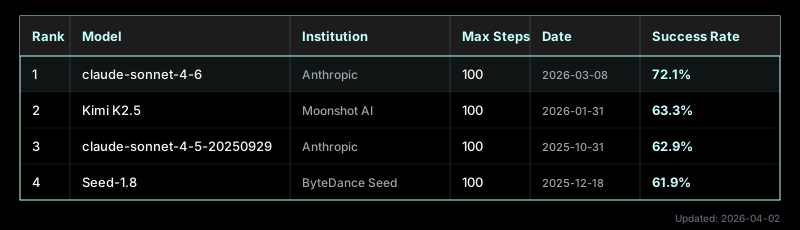
Desktest uses the same agent harness as the OSWorld benchmark for evaluating multimodal agents on real-world computer tasks. The leaderboard below tracks which models perform best, updated weekly:
- Define task & config in
task_name.json - Monitor your agent using the computer/desktop app:
desktest run task_name.json --monitor - Keep looping steps 2,3 until happy with agent computer-use.
- → if ✅ → Codify → deterministic python script (reusable for CI/CD) (
desktest codify trajectory.jsonl) - → if ❌ → debug with coding agents via
desktest logs desktest_artifacts/
- → if ✅ → Codify → deterministic python script (reusable for CI/CD) (
desktest run task_name.json --replay(Deterministic replay, reusing agent trajectory with PyAutoGUI code)
- Define task & config in
task_name.json - Monitor your agent using the computer/desktop app:
desktest run task_name.json --monitor --qa - Bugs reported via slack & markdown!
TLDR: Run desktest doctor to verify your setup.
Expand
To run tests (Linux — default):
- Linux or macOS host
- Docker daemon running (Docker Desktop, OrbStack, Colima, etc.)
- An LLM API key (OpenAI, Anthropic, or compatible), or a CLI-based provider: Claude Code (
--provider claude-cli) or Codex CLI (--provider codex-cli) — not needed for--replaymode
To run tests (macOS apps)
- Apple Silicon Mac (M1 or later) running macOS 13+
- Tart installed (
brew install cirruslabs/cli/tart) - sshpass installed (
brew install hudochenkov/sshpass/sshpass) — for golden image provisioning - A golden image prepared via
desktest init-macos(handles Python, PyAutoGUI, a11y helper, TCC permissions, and SSH key setup automatically) - An LLM API key (same as Linux), or
--provider claude-clito use your Claude Code subscription - 2-VM limit: Apple's macOS SLA and Virtualization.framework permit max 2 macOS VMs simultaneously per Mac. See macOS Support for details and Apple TOS compliance.
To run tests (Windows apps)
- Linux host with KVM enabled (Intel VT-x or AMD-V)
- QEMU, OVMF, swtpm, and virtiofsd installed (
sudo apt install qemu-system-x86 qemu-utils ovmf swtpm virtiofsd) - sshpass installed (
sudo apt install sshpass) — for golden image provisioning - genisoimage or mkisofs installed (
sudo apt install genisoimage) — for golden image provisioning - A Windows 11 ISO (evaluation or licensed) and VirtIO driver ISO
- A golden image prepared via
desktest init-windows(handles Python, PyAutoGUI, uiautomation, WinFsp, agent scripts, and system configuration automatically) - An LLM API key (same as Linux), or
--provider claude-clito use your Claude Code subscription
See Windows CI Guide for CI/CD setup details.
To build from source (optional):
- Rust toolchain (
cargo) - Git
- Xcode Command Line Tools (for macOS a11y helper binary — macOS only)
One-line install (pre-built binary)
curl -fsSL https://raw.githubusercontent.com/Edison-Watch/desktest/master/install.sh | sh⚙️ Building from source
# Or build from source
git clone https://github.com/Edison-Watch/desktest.git
cd desktest
make install_cli
TLDR: See interactive examples in /examples/README.md
Expand
# Validate a task file
desktest validate elcalc-test.json

# Run a single test
desktest run elcalc-test.json

# Run a test suite
desktest suite tests/

# Interactive debugging (starts container, prints VNC info, pauses)
desktest interactive elcalc-test.json

# Step-by-step mode (pause after each agent action)
desktest interactive elcalc-test.json --stepTLDR: desktest --help
Expand
desktest [OPTIONS] <COMMAND>

Commands:
  run           Run a single test from a task JSON file (supports --replay for deterministic mode)
  suite         Run all *.json task files in a directory
  interactive   Start container and pause for debugging
  attach        Attach to an existing running container (supports --replay)
  validate      Check task JSON against schema without running
  codify        Convert trajectory to deterministic Python replay script
  review        Generate interactive HTML trajectory viewer
  logs          View trajectory logs in the terminal (supports --steps N, N-M, or N,M,X-Y)
  monitor       Start a persistent monitor server for multi-phase runs
  init-macos    Prepare a macOS golden image for Tart VM testing
  init-windows  Prepare a Windows 11 golden image for QEMU/KVM testing
  doctor        Check that all prerequisites are installed and configured
  update        Update desktest to the latest release from GitHub

Options:
  --config <FILE>            Config JSON file (optional; API key can come from env vars)
  --output <DIR>             Output directory for results (default: ./test-results/)
  --debug                    Enable debug logging
  --verbose                  Include full LLM responses in trajectory logs
  --record                   Enable video recording
  --monitor                  Enable live monitoring web dashboard
  --monitor-port <PORT>      Port for the monitoring dashboard (default: 7860)
  --monitor-bind-addr <ADDR> Bind address for dashboard (default: 127.0.0.1, use 0.0.0.0 for remote)
  --resolution <WxH>         Display resolution (e.g., 1280x720, 1920x1080, or preset: 720p, 1080p)
  --artifacts-dir <DIR>      Directory for trajectory logs, screenshots, and a11y snapshots
  --no-artifacts             Skip artifact collection entirely
  --artifacts-timeout <SECS> Timeout for artifact collection (default: 120, 0 = no limit)
  --artifacts-exclude <GLOB> Glob patterns to exclude from artifact collection (repeatable)
  --qa                       Enable QA mode: agent reports app bugs during testing
  --with-bash                Allow the agent to run bash commands inside the container (disabled by default)
  --no-network               Disable outbound network from the container (Docker network mode "none")
  --provider <PROVIDER>      LLM provider: anthropic, openai, openrouter, cerebras, gemini, claude-cli, codex-cli, custom
  --model <MODEL>            LLM model name (overrides config file)
  --api-key <KEY>            API key for the LLM provider (prefer env vars to avoid shell history exposure)
  --llm-max-retries <N>      Max retry attempts for retryable LLM API failures
Expand
Tests are defined in JSON files. Here's a complete example that tests a calculator app:
{
  "schema_version": "1.0",        // Required: task schema version
  "id": "elcalc-addition",        // Unique test identifier
  "instruction": "Using the calculator app, compute 42 + 58.",  // What the agent should do
  "completion_condition": "The calculator display shows 100 as the result.",  // Success criteria (optional)
  "app": {
    "type": "appimage",            // How to deploy the app (see App Types below)
    "path": "./elcalc-2.0.3-x86_64.AppImage"
  },
  "evaluator": {
    "mode": "llm",                 // Validation mode: "llm", "programmatic", or "hybrid"
    "llm_judge_prompt": "Does the calculator display show the number 100 as the result? Answer pass or fail."
  },
  "timeout": 120                   // Max seconds before the test is aborted
}
The optional completion_condition field lets you define the success criteria separately from the task instruction. When present, it's appended to the instruction sent to the agent, and rendered as a collapsible section in the review and live dashboards.
See examples/ for more examples including folder deploys and custom Docker images.
| Type | Description |
|---|---|
appimage |
Deploy a single AppImage file |
folder |
Deploy a directory with an entrypoint script |
docker_image |
Use a pre-built custom Docker image |
vnc_attach |
Attach to an existing running desktop (see Attach Mode) |
macos_tart |
macOS app in a Tart VM — isolated, destroyed after test (see macOS Support) |
macos_native |
macOS app on host desktop, no VM isolation (see macOS Support) |
windows_vm |
Windows app in a QEMU/KVM VM — isolated, QCOW2 overlay destroyed after test (see Windows CI Guide) |
windows_native |
Windows app on host desktop, no VM isolation (scaffolding — full implementation pending) |
Electron apps: Add
"electron": trueto your app config to use thedesktest-desktop:electronimage with Node.js pre-installed. See examples/ELECTRON_QUICKSTART.md.
| Metric | Description |
|---|---|
file_compare |
Compare a container file against an expected file (exact or normalized) |
file_compare_semantic |
Parse and compare structured files (JSON, YAML, XML, CSV) |
command_output |
Run a command, check stdout (contains, equals, regex) |
file_exists |
Check if a file exists (or doesn't) in the container |
exit_code |
Run a command, check its exit code |
script_replay |
Run a Python replay script, check for REPLAY_COMPLETE + exit 0 |
TLDR: Do desktest run task_name.json --monitor to launch real-time agent monitoring dashboard, desktest review for post-run dashboard.
Expand
Add --monitor to any run or suite command to launch a real-time web dashboard that streams the agent's actions as they happen:
# Watch a single test live
desktest run task.json --monitor

# Watch a test suite with progress tracking
desktest suite tests/ --monitor

# Use a custom port
desktest run task.json --monitor --monitor-port 8080
Open http://localhost:7860 in your browser to see:
- Live step feed: screenshots, agent thoughts, and action code appear as each step completes
- Test info header: test ID, instruction, VNC link, and max steps
- Suite progress: progress bar showing completed/total tests during suite runs
- Status indicator: pulsing dot shows connection state (live vs disconnected)
The dashboard uses the same UI as desktest review — a sidebar with step navigation, main panel with screenshot/thought/action details. The difference is that steps stream in via Server-Sent Events (SSE) instead of being loaded from a static file.
TLDR: Let the agent report bugs in your application on slack, with some guidance
Expand
Add --qa to any run, suite, or attach command to enable bug reporting. The agent will complete its task as normal, but also watch for application bugs and report them as markdown files:
# Run a test with QA bug reporting
desktest run task.json --qa

# QA mode in a test suite
desktest suite tests/ --qa
When --qa is enabled:
- The agent gains a
BUGcommand to report application bugs it discovers - Bash access is automatically enabled for diagnostic investigation (log files, process state, etc.)
- Bug reports are written to
desktest_artifacts/bugs/BUG-001.md,BUG-002.md, etc. - Each report includes: summary, description, screenshot reference, accessibility tree state
- The agent continues its task after reporting — multiple bugs can be found per run
- Bug count is included in
results.jsonand the test output
Expand
Optionally send bug reports to Slack as they're discovered. Add an integrations section to your config JSON:
{
  "integrations": {
    "slack": {
      "webhook_url": "https://hooks.slack.com/services/T.../B.../xxx",
      "channel": "#qa-bugs"
    }
  }
}
Or set the DESKTEST_SLACK_WEBHOOK_URL environment variable (takes precedence over config). The channel field is optional — webhooks already target a default channel. Notifications are fire-and-forget and never block the test.
Expand
Developer writes task.json
        │
        ▼
   ┌──────────────┐
   │ desktest CLI  │  validate / run / suite / interactive
   └────┬─────────┘
        │
        ├─── Linux ──────────────┐  ├─── macOS ─────────────┐  ├─── Windows ────────────┐
        │  Docker Container      │  │  Tart VM / native host │  │  QEMU/KVM VM           │
        │  Xvfb + XFCE + x11vnc  │  │  Native macOS desktop  │  │  Windows 11 desktop    │
        │  PyAutoGUI (X11)       │  │  PyAutoGUI (Quartz)    │  │  PyAutoGUI (Win32)     │
        │  pyatspi (AT-SPI2)     │  │  a11y-helper (AXUIEl.) │  │  uiautomation (UIA)    │
        │  scrot (screenshot)    │  │  screencapture         │  │  PIL ImageGrab         │
        └──────────┬─────────────┘  └──────────┬─────────────┘  └──────────┬─────────────┘
                   │ screenshot + a11y tree     │                          │
                   └──────────────┬─────────────┴──────────────────────────┘
                                  ▼
                     ┌──────────────────┐
                     │  LLM Agent Loop  │  observe → think → act → repeat
                     │  (PyAutoGUI code)│
                     └────────┬─────────┘
                              │
                              ▼
                     ┌──────────────────┐
                     │  Evaluator       │  programmatic checks / LLM judge / hybrid
                     └────────┬─────────┘
                              │
                              ▼
                     results.json + recording.mp4 + trajectory.jsonl
Files generated as a result of a desktest run.
Expand
Each test run produces:
test-results/
  results.json                # Structured test results (always)

desktest_artifacts/
  recording.mp4               # Video of the test session (with --record)
  trajectory.jsonl            # Step-by-step agent log (always)
  agent_conversation.json     # Full LLM conversation (always)
  step_001.png                # Screenshot per step (always)
  step_001_a11y.txt           # Accessibility tree per step (always)
  bugs/                       # Bug reports (with --qa)
    BUG-001.md                # Individual bug report (with --qa)
Expand
| Code | Meaning |
|---|---|
| 0 | Test passed |
| 1 | Test failed |
| 2 | Configuration error |
| 3 | Infrastructure error |
| 4 | Agent error |
TLDR: LLM API keys + Webhooks for QA mode
Expand
| Variable | Description |
|---|---|
OPENAI_API_KEY |
OpenAI API key |
ANTHROPIC_API_KEY |
Anthropic API key |
OPENROUTER_API_KEY |
OpenRouter API key |
CEREBRAS_API_KEY |
Cerebras API key |
GEMINI_API_KEY |
Gemini API key |
CODEX_API_KEY |
Codex CLI API key (alternative to ChatGPT login) |
LLM_API_KEY |
Fallback API key for any provider |
DESKTEST_SLACK_WEBHOOK_URL |
Slack Incoming Webhook URL for QA bug notifications (overrides config) |
GITHUB_TOKEN |
GitHub token (used by desktest update) |