Setting globalAlpha to a value other than 1 messes with CanvasPatterns #2172

Description

Issue
Setting globalAlpha to a value other than 1 messes with CanvasPatterns.
Steps to Reproduce
Change the value set by globalAlpha in the code below:
const { createCanvas, loadImage, DOMMatrix } = require("canvas");
const canvas = createCanvas(200, 200);
const ctx = canvas.getContext("2d");

const svg = `<svg viewBox="0 0 64 64" width="64" height="64" xmlns="http://www.w3.org/2000/svg">
<path
  fill="none"
  d="M-32 16s16.915 32 32 32 16.915-32 32-32 16.915 32 32 32 32-32 32-32"
  stroke="#CC0000"
  stroke-width="4.5"
  stroke-linejoin="round" />
</svg>`;

const dataUrl = `data:image/svg+xml;base64,${btoa(svg)}`;

loadImage(dataUrl).then((image) => {
  const pattern = ctx.createPattern(image, "repeat");
  pattern.setTransform(new DOMMatrix([1, 0, 0, 1, 32, 32]));
  ctx.globalAlpha = 1;
  ctx.fillStyle = pattern;
  ctx.fillRect(0, 0, 128, 128);
  console.log(canvas.toDataURL());
});
Setting globalAlpha to 1 results in this (with the pattern how it expect it to be):

Setting globalAlpha to 0.555 (or any other value) results in this:
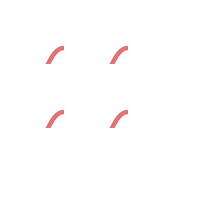
The order of operations does not appear to matter.
Your Environment
- Version of node-canvas: 2.10.2
- Environment: Node 16.13.1 @ Ubuntu 22.04.1 LTS (5.15.0-10053-tuxedo)